Any questions? Give us a call 05 375 3220
Free delivery for orders over 1000 € / 30 days Return policy
Any questions? Give us a call 05 375 3220
Free delivery for orders over 1000 € / 30 days Return policy
Once you’ve bought a new camera, the next question is: which software should you use to edit your photos? The two most popular options amongst professionals and serious amateur photographers are Capture One and Adobe Lightroom. Both are excellent for processing RAW images, but they are designed for slightly different needs – and their pricing structures also differ.
Here at Foto Monza, we sell Capture One and use both programmes, so we’ve put together this practical comparison: where each one excels and which one suits your style of photography.
For many people, this is the most crucial difference. Lightroom It is available only as part of a monthly subscription to Adobe’s photography suite, which includes Lightroom, Lightroom Classic and Photoshop. When the subscription ends, the programmes will no longer function fully.
Capture One’s can be purchased either to order or as a one-off purchase (perpetual licence). The version you purchase with a permanent licence is yours to keep for life, and there are no monthly fees. Major new versions are paid updates, but you can decide for yourself when to update. In the long run, a one-off purchase is often more cost-effective if you don’t need every new feature straight away.
The prices of both have risen in recent years, so please check the current prices with the manufacturers. You can purchase a permanent licence for Capture One from us, and at a reduced price when purchased with a camera.
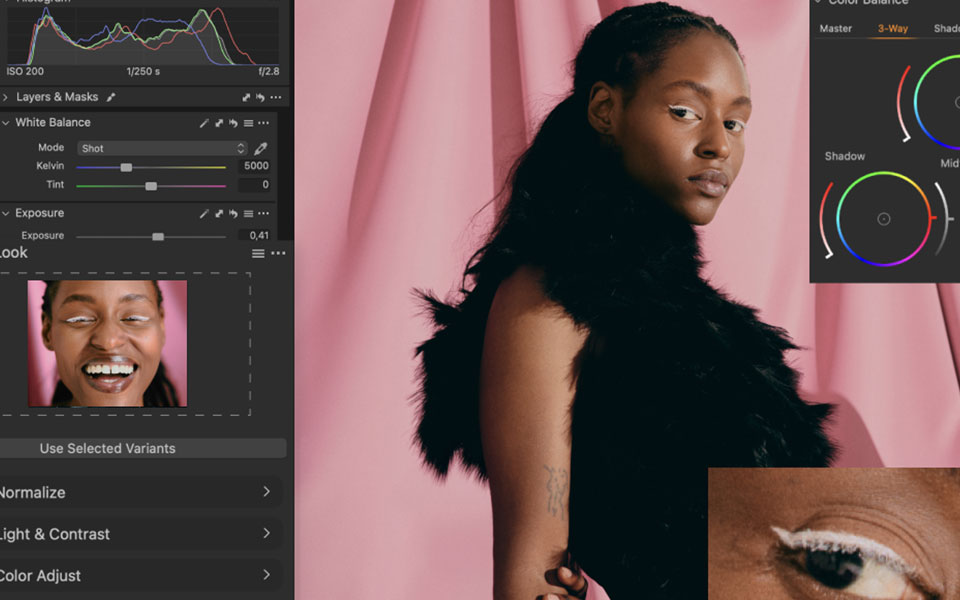
Capture One’s colour rendering is widely regarded as the best in the industry. The software was originally developed to meet the needs of a medium-format camera manufacturer, and its camera profiles produce natural skin tones and rich colours from RAW images even before any adjustments are made. Colour Editor With this tool, you can adjust individual tones with exceptional precision, which is a major advantage for portrait, product and wedding photographers.
Lightroom’s colours are also excellent, and its profiles and presets are easy to use. The difference is mainly noticeable in demanding colour work – for ordinary amateur use, both produce excellent results.
In studio photography, the camera is often connected to a computer via a cable, so that the images appear immediately on a large screen. In this respect, Capture One is the clear leader: the connection is fast and stable, the camera can be controlled from within the programme, and settings can be automatically applied to each new image. That is why Capture One is the go-to tool for product and fashion photographers. Lightroom Classic also supports tethering, but its features are more limited.
Lightroom is at its best when dealing with tens or hundreds of thousands of photos. Thanks to cataloguing, keywords, face recognition and search functions, even old photos can be found quickly. The cloud-based Lightroom synchronises photos and adjustments across your computer, tablet and mobile phone.
In Capture One, you can choose Catalogue-space for the entire archive, or Sessions- a space where every project – such as a wedding shoot or a client’s product shoot – has its own folder. Sessions is a favourite amongst professionals because projects can be easily moved and archived as a single unit.
Both now feature AI-based masks that allow you to select the sky, subject or background with a single click. Capture One uses, just like Photoshop, levels, which makes the local adjustments clear and precise. Lightroom, meanwhile, features Adobe’s generative AI tools, such as the removal of distracting objects, and, if necessary, you can transfer the image directly to Photoshop.
Lightroom is easier for beginners: the user interface is straightforward and there are loads of tutorial videos available. Capture One’s interface is more versatile and fully customisable, which requires a bit more learning at the start – but pays off once you’ve built a workflow tailored to your own needs.
| Feature | Capture One | Lightroom |
|---|---|---|
| Licence | One-off purchase or subscription | By subscription only |
| Colour processing | Excellent, the benchmark in the industry | Very good |
| Tethering | The best available | Basic level (Classic) |
| Image archive management | Good, Sessions projects | Excellent |
| Local regulations | Levels and AI masks | AI masks |
| Mobile and cloud | Limited | Excellent synchronisation |
| Photoshop included | No | Yes, in the photography package |
| Learning threshold | Intermediate level | Easy |
| Free trial | 30 days | Yes |
Choose Capture One if:
Choose Lightroom if:
A free trial version is available for both, so the best way to decide is to try them out with your own photos. Process the same RAW image using both programmes and see which one feels more natural.
We sell A Capture One Pro licence as a permanent licence that supports hundreds of cameras and lenses from all the major manufacturers. When you buy Capture One alongside a new camera, you get it at a reduced price – you’ll find this option listed as an additional choice on the camera’s product page.
Are you still choosing a camera? Take a look system cameras, second-hand system cameras or read our comparison Sony A7R V vs A7 IV. If you need help choosing a programme or a camera, please call us on 05-375 3220 or pop into our shop in Kouvola.